
Peacock TV: Stream TV & Movies
Peacock TV LLCEntertainment
4.683.29K Reviews
- Version
- Varies With Device
- Installs
- 50.00M
- Age Rating
- Teen
Screenshots



Our Review of Peacock TV: Stream TV & Movies
 Analysis by Appyee
I tend to notice the small snags in a streaming app before I settle in: a show is hard to find, a stream takes a while to start, or I’m not sure whether a title is included in the option I’m using. Peacock TV: Stream TV & Movies is worth considering if you want TV, films, live programming, and sports in one place, but it helps to approach it with a little patience and a clear idea of what you want to watch. In my experience, the best way to judge it is not by the size of its catalogue alone, but by how easily it fits into an ordinary evening.
Where streaming can get frustrating
The main appeal is variety, and that can also make choosing less immediate. When I open a service for one specific programme, I want to find it quickly; when I open one without a plan, rows of options can turn a short break into an extended browse. Peacock groups entertainment into sections, which gives me useful starting points, but I still recommend searching by title when I already know what I’m after rather than scrolling through recommendations.
Another practical point is that the app brings together different kinds of viewing. A film, an episode, a live channel, and a sports event don’t necessarily fit the same mood or schedule. If I have only a few minutes, I’m more likely to choose something on demand. If I can make time for a live event, the live section becomes more relevant. Thinking about the kind of viewing I want before opening the app makes the choice feel less scattered.
Checks that make setup easier
Peacock is a free entertainment app from Peacock TV LLC, with in-app purchases for people who want to consider paid options. Before settling on a plan, I’d check what the app currently lets me watch and whether the titles I care about are available to me. The app’s free entry point is useful for exploring, but I wouldn’t assume every programme or viewing condition is identical across options. Confirming the details in the app before committing is a more reliable approach than choosing based on a single show.
It is also worth checking the basics before blaming the app for a playback problem. I first make sure the device has a working internet connection, then try another title to see whether the issue affects everything or only one programme. If other apps are also struggling to stream, the connection or device may be the more likely source. If Peacock alone is having trouble, closing and reopening it is a sensible first step before trying again.
Peacock is rated for Teen audiences, so households should keep that in mind when deciding who will use it. I would not treat a general entertainment catalogue as automatically suitable for every child; it is better to check the particular title before putting something on for a younger viewer. That small check is especially useful when different people in a household share a screen and have different expectations about what is appropriate.
First Impressions and Interface
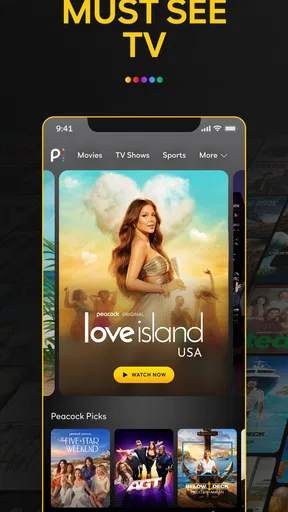
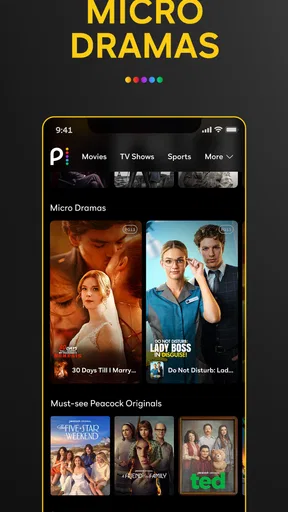
Right off the bat, the interface of Peacock TV: Stream TV & Movies caught my eye. It's sleek, straightforward, and super user-friendly. Navigating through the app felt like a breeze, with everything neatly categorized. You can jump between trending shows, movies, and even live TV with just a few taps. The design is intuitive, making it easy for even the least tech-savvy among us to dive right in.
Content Galore
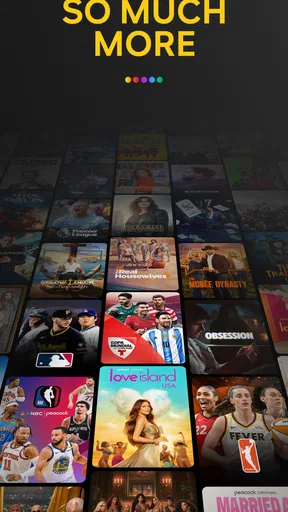
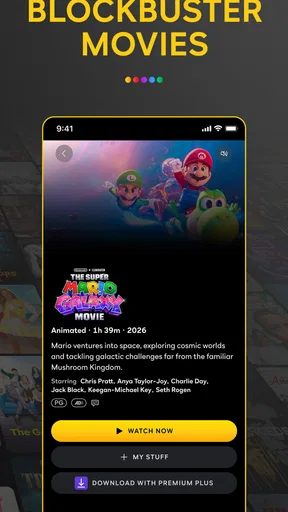
Now, let's talk content. Peacock doesn't skimp on the selection. From classic TV series that bring a wave of nostalgia to exclusive originals that spark curiosity, there's something for everyone. Whether you’re into comedy, drama, or documentaries, Peacock has got you covered. I was particularly impressed with the variety of movies available, ranging from recent blockbusters to timeless classics. It’s like having a mini cinema right in your pocket!
Live TV and Sports
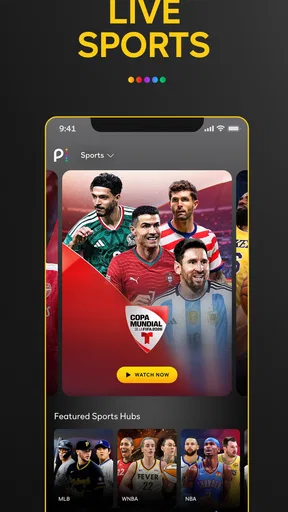
One feature that stood out to me is the live TV option. Being able to catch up on news or watch a live sports event on the go is a game-changer. For sports fans, Peacock offers a decent selection of events, including Premier League matches, which is a huge plus for soccer aficionados like myself.
Free and Premium Plans
Peacock offers a free tier, which is awesome if you’re looking to explore without commitment. However, if you're anything like me and can't stand ads, the premium plans might be worth considering. They offer more content and a smoother viewing experience without interruptions. It’s a nice option to have, depending on how you like to consume your content.
Using it in a real routine
A realistic use for me is opening Peacock after dinner to watch an episode, then returning later in the week for a film or a live event. That mix makes the app more useful than a service I’d open only for one particular series. It also gives me a reason to browse at different times: I can pick an on-demand title when I want control over the pace, or check live programming when I want something happening in the moment.
One useful habit is to decide whether I’m browsing for a specific title or looking for a general recommendation. Those are different tasks. For a specific programme, searching directly saves time; for a relaxed browse, the categories are a better fit. I also check whether a title is available in the option I’m using before planning a whole evening around it. That avoids the disappointing moment of finding something interesting only to discover I need to reconsider my plan.
What it does better than a single-purpose option
Compared with a service I use mainly for one network, one genre, or a particular kind of live event, Peacock’s appeal is its combination of films, series, and live viewing. I find that breadth handy when a household cannot agree on one type of entertainment. The trade-off is that a specialist service may be a better choice if I care about one narrow catalogue above all else. Peacock makes more sense as a broad option than as a guaranteed replacement for every other subscription or source of programming.
It also differs from simply watching clips or short videos: it is built around settling in for longer entertainment, whether that means a film, an episode, or a live event. That is a strength when I have time to watch, but not necessarily when I only want a quick distraction. I would choose based on the evening I’m planning, not assume that one app is the right answer for every kind of screen time.
When a stream does not behave as expected
If playback stalls, I avoid changing several things at once. I test another programme, check whether the connection is stable, and reopen the app. This simple sequence helps separate a title-specific hiccup from a wider connection issue. If the problem appears on multiple services, I focus on the network or device; if it happens only in Peacock, I try again after reopening it. These are basic checks, not a promise that every interruption can be fixed from the app side.
If the app opens but a particular event or programme is not what I expected, I check the title and its viewing details rather than repeatedly restarting playback. For live sports, timing matters more than it does for an episode I can start whenever I like, so I plan around the event instead of assuming it will work like on-demand TV. That distinction is easy to overlook when both kinds of content sit inside the same entertainment app.
Who will enjoy it, and who may prefer something else
I’d recommend giving Peacock a look if you want one app that brings together series, movies, live television, and sports, and you are comfortable exploring a mix of on-demand and live choices. It is especially appealing to someone who likes having alternatives ready for different moods rather than subscribing solely for one favourite show. Its broad selection and free starting point make it reasonable to try before deciding whether a paid option suits your viewing habits.
I’d be more cautious if you dislike advertising, want a very specific title above everything else, or expect one service to replace all the others you use. The free tier may be a convenient way to explore, but viewers who strongly prefer uninterrupted watching should look carefully at the available paid choices and their terms before deciding. A specialist service may also be a better fit if the content you care about most is concentrated elsewhere.
Peacock has an average rating of 4.5 from around 568,000 ratings, and it has been installed over 50 million times. Those figures suggest that it has found a substantial audience, but they do not tell me whether its selection matches a particular viewer’s taste. I put more weight on whether the programmes I want are available and whether the app’s mix of live and on-demand viewing suits my routine.
Final Thoughts
So, is Peacock TV: Stream TV & Movies worth a download? I’d say absolutely. With its vast range of shows, movies, and live content, it’s a solid addition to your streaming arsenal. Whether you're a casual viewer or a dedicated binge-watcher, this app has a little something for everyone. Give it a whirl, and you might just find your new favorite show or movie!
Happy streaming!
My practical verdict is that Peacock is most rewarding when I treat it as a flexible entertainment option, not as a promise that every favourite will be in one place. Its interface makes casual discovery approachable, while the combination of live events and on-demand viewing gives it a role beyond a standard film-and-series catalogue. The main friction is deciding what is available under the option I’m using and whether the viewing experience fits my preferences, especially around ads.
The app is free to install, is rated Teen, and includes in-app purchases priced from $7.99 to $169.99 per item. It was released on July 13, 2020. I’d start by exploring the available content and checking the plan details in the app, then decide whether its particular blend of television, movies, and sports earns a regular place in my streaming rotation. If that blend matches what you actually watch, it is an easy one to try; if you need a narrow catalogue or an uninterrupted experience above all else, compare your options first.
Privacy and Permissions
See what permissions an app requests and how it handles your data.
- Identity
- find accounts on the device, add or remove accounts
- Contacts
- find accounts on the device
- Location
- approximate location (network-based)
- Wi-Fi connection information
- view Wi-Fi connections
- Other
- view network connections, create accounts and set passwords, full network access, run at startup, draw over other apps, control vibration, prevent device from sleeping
Verdict
Strengths of Peacock TV: Stream TV & Movies
- Extensive library of NBC shows.
- User-friendly interface and navigation.
- Affordable subscription options.
- Offline downloads for select titles.
- Live sports streaming available.
Limitations of Peacock TV: Stream TV & Movies
- Ads in free version can be intrusive.
- Limited 4K content available.
- Some shows require premium access.
- Occasional buffering issues.
- Region restrictions on certain content.
Similar Picks in This Category
View All
Google Play Games
Google LLC3.9

Netflix
Netflix, Inc.4.8

YouTube Kids
Google LLC4.2

Disney+
Disney4.4

Prime Video
Amazon Mobile LLC4.7

Steam
Valve Corporation3.2
Frequently Asked Questions
What is Peacock TV and what content does it offer?
Peacock TV is a streaming service that provides a wide range of content including movies, TV shows, news, sports, and exclusive original programming. It features content from NBCUniversal and other studios, offering both popular classics and new releases. The app caters to various interests, making it a versatile choice for entertainment.
Is Peacock TV free to use, or is there a subscription fee?
Peacock TV offers a free tier with limited content and ads. For a more extensive library and fewer advertisements, users can subscribe to Peacock Premium or Premium Plus. The Premium plan provides additional content, while Premium Plus offers an ad-free experience. Subscription fees vary, so checking the latest pricing on their website is recommended.
What devices are compatible with Peacock TV?
Peacock TV is compatible with a variety of devices, including iOS and Android smartphones and tablets, smart TVs, gaming consoles, and streaming devices such as Roku and Amazon Fire TV. This broad compatibility ensures users can enjoy their favorite content on the device of their choice, whether at home or on the go.
Does Peacock TV offer live streaming of TV channels?
Yes, Peacock TV provides live streaming of certain TV channels, including news and sports events. The availability of live channels may depend on the user's subscription plan and location. It offers a convenient way to watch live broadcasts alongside on-demand content, enhancing the overall viewing experience.
Can I download content from Peacock TV for offline viewing?
Currently, Peacock TV allows downloads for offline viewing with its Premium Plus subscription. This feature is particularly useful for users who want to watch content without an internet connection, such as during travel. Users should ensure they have adequate storage space on their devices for downloaded content.
